Keyword Cluster Tool: Group Thousands of Keywords by Intent, Fast
On this page
A keyword cluster tool takes a big, messy list of keywords and automatically sorts them into tight topic groups based on shared meaning and search intent — so you know exactly how many pages to build, which keywords belong together, and where the real demand is hiding. Do it by hand and it’s an afternoon of squinting at a spreadsheet. Do it with the right tool and it’s one click.
If you’ve ever exported 5,000 keywords and felt your soul quietly leave your body, this is the tool you were missing.
What a keyword cluster tool actually does
A keyword cluster tool automates the single most tedious step in keyword research: turning a flat list into an organized content plan. Specifically, a good one will:
- Group keywords by shared intent — “keyword research tool,” “best keyword tool,” and “keyword software” land in one cluster, because they’re the same search wearing different words.
- Show demand per cluster — total monthly search volume for the whole group, so you can prioritize topics by the traffic they actually represent.
- Reveal how many pages you need — each cluster is one page. The tool hands you your content calendar.
- Do it at scale — hundreds or thousands of keywords in seconds, not hours.
If you want the deeper why behind grouping, we cover it in keyword clustering explained. This page is about the tool — what to look for and how to actually do it.
Why clustering matters (the short, painful version)
Skip clustering and you’ll do what most people do: write a separate page for “keyword research tool,” another for “best keyword research tool,” and a third for “keyword research software.” Then you’ll watch all three flail, because they’re fighting each other for the same rankings. Google calls this keyword cannibalization. You’ll call it “why isn’t anything ranking.”
A keyword cluster tool prevents that by showing you, instantly, that those three are one page — a single, authoritative page that can actually win. Clustering is how you:
- Avoid cannibalization — one strong page instead of three weak ones
- Build topical authority — covering a topic’s full cluster tells Google you own it
- Prioritize by real demand — see which clusters carry the volume worth chasing
- Plan content in minutes — clusters become your publishing roadmap
What to look for in a keyword cluster tool
Not all clustering is created equal. The features that actually matter:
- Intent-based grouping, not just string matching. Cheap tools group by matching words. Good tools group by what the searcher wants.
- Volume totals per cluster. A cluster of 40 keywords means nothing until you see it’s worth 70,000 searches/month. That number is how you prioritize.
- Scale without choking. It should handle tens of thousands of keywords without turning into a loading spinner.
- It connects to the rest of your workflow. Clustering is one step. The best tools also expand seeds, pull search volume, and export — so you’re not stitching five tools together.
- It’s fast and yours. Web tools throttle and meter. A desktop tool runs at your machine’s speed, on your schedule.
KeywordOrbit: clustering built into the whole workflow
KeywordOrbit is a desktop keyword cluster tool that does the grouping automatically — and, crucially, doesn’t make you leave to do everything around it. In one app you:
- Expand a seed into hundreds of real keywords (bulk keyword research)
- Pull search volume — free via your Google Ads login or via API (free search volume)
- Cluster the whole list into topic groups with one click
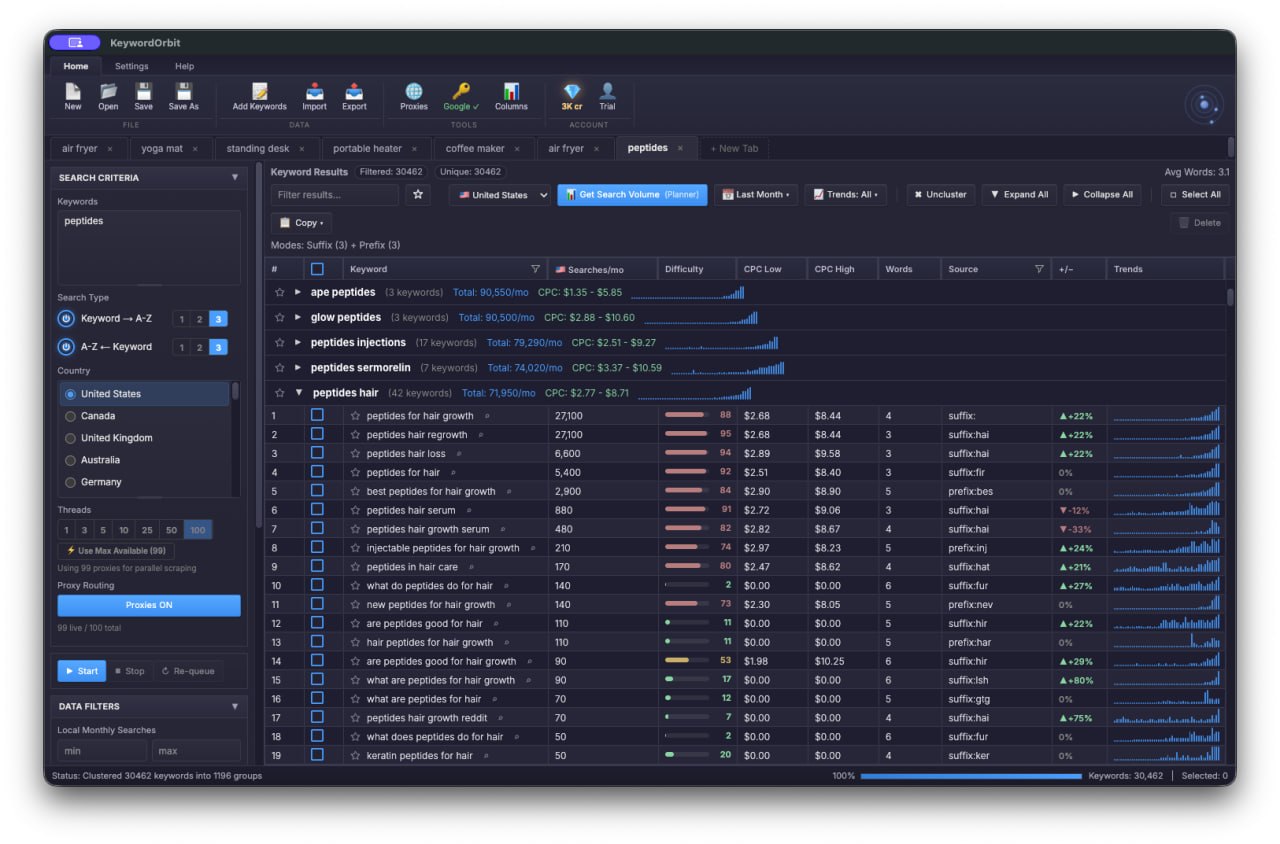
- See total monthly volume per cluster, sorted high to low, so the biggest opportunities float to the top
- Export the clustered list to CSV and start writing
As the screenshot above shows, it clustered 30,000+ keywords into ~1,200 groups in a single run — each group tagged with its total search demand. That’s the difference between “I have a keyword list” and “I have a content plan.”
How to cluster keywords with KeywordOrbit
- Add your keywords — type a seed and expand it, paste a list, or import a CSV.
- Pull volume — run Planner mode (free) or API mode for the whole list.
- Click cluster — KeywordOrbit groups everything by topic and intent automatically.
- Sort by cluster volume — the highest-demand topics rise to the top.
- Plan and export — one cluster = one page. Export and start publishing.
That’s it. The hour-long spreadsheet ritual becomes a few clicks.
Keyword cluster tool: quick questions
Is a keyword cluster tool worth it? If you publish more than a handful of pages, yes. Manual clustering is slow and error-prone, and getting the grouping wrong means cannibalized pages that never rank. The tool pays for itself the first time it saves you from building three competing pages.
Can’t I just cluster keywords in a spreadsheet? For 30 keywords, sure. For 3,000, you’ll be there all day — and you’ll still miss the volume-per-cluster math that tells you what to prioritize. That’s exactly the work a keyword cluster tool deletes.
What’s the difference between clustering and grouping? Nothing, really — they’re used interchangeably. The important distinction is intent-based clustering (grouping by what searchers want) versus crude string-matching (grouping by shared words). You want the former.
Does KeywordOrbit cluster automatically? Yes — one click clusters your entire list by topic and shows total search volume per group. No manual sorting required.
Stop organizing keywords by hand
A keyword cluster tool is the difference between drowning in a keyword export and walking away with a ranked content plan. KeywordOrbit does the clustering — plus the expansion, the volume, and the export — in one desktop app, so the whole research-to-plan pipeline happens in one place.
Try keyword clustering in KeywordOrbit
KeywordOrbit is a desktop keyword research tool for Windows & Mac — bulk autocomplete expansion, real search volume (free via Google Keyword Planner or via API), clustering, CPC, and CSV export. One-time license, $97 at launch (normally $149): 2 computers, 25,000 API credits included, 14-day money-back guarantee.
Get KeywordOrbit →