The Complete Guide to Keyword Research (2026)
On this page
Keyword research is the unglamorous habit that separates people who guess what to write from people who know. It’s the process of finding the actual phrases humans type into a search box, then deciding which ones are worth building a page around. Get it right and everything downstream — content, on-page SEO, paid search — stops being a coin flip.
Skip it, and you’re writing love letters to an audience that isn’t there.
This guide walks the whole workflow, from a single seed keyword to a prioritized list you can actually publish against — no 4,000-word detours about the history of search engines.
What keyword research actually is (and what it isn’t)
Good keyword research answers three questions for every phrase:
- Demand — how many people actually search it?
- Difficulty — how hard will it be to outrank whoever’s already there?
- Intent — what does the searcher actually want — to learn, to buy, to find a tool?
What it is not: hoarding a spreadsheet of 10,000 keywords and feeling productive. A giant list with no volume, no intent, and no grouping isn’t research — it’s a digital junk drawer. The value isn’t in collecting. It’s in the filtering and the grouping that come after.
Step 1 — Start with seed keywords
A seed is the root phrase your audience cares about — “keyword research,” “running shoes,” “tax software.” You need a handful, not a hundred. Everything else grows from these.
Steal seeds from:
- Your own product or service categories
- The exact words customers use in reviews and support tickets (gold, this one)
- Competitor homepages and category pages
- Google Autocomplete — type your topic and read what Google volunteers
Step 2 — Expand seeds into hundreds of real keywords
Here’s where the magic — and the volume — comes from. The most reliable free source of real keyword ideas is Google Autocomplete, because those suggestions aren’t invented; they’re phrases Google has watched real people type.
A few expansion patterns turn one seed into a crowd:
- Suffix A–Z —
keyword research a,keyword research b, all the way to z. Each letter coughs up new ideas. - Prefix A–Z —
best keyword research,free keyword research, and friends. - Question modifiers —
how,what,why,best,free,vs. - Multi-level depth — take a suggestion and expand it again. Turtles all the way down.
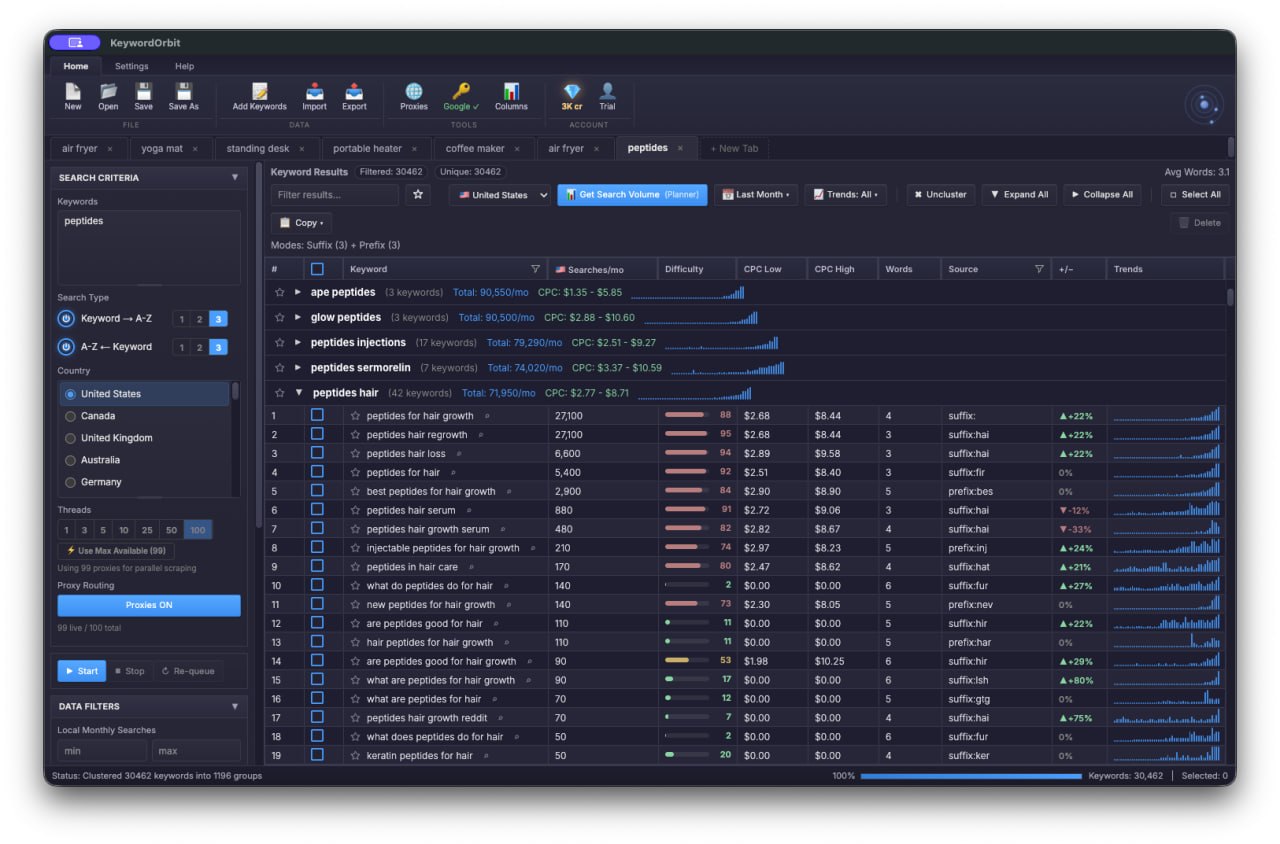
Doing this by hand is a special kind of tedium. KeywordOrbit automates suffix and prefix expansion (a–z and 0–9) across up to three depth levels, pulling hundreds of autocomplete suggestions from one seed in a single run — so you can spend your time choosing keywords instead of typing the alphabet. (More on this in using Google Autocomplete for keyword ideas and bulk keyword research.)
Step 3 — Get search volume
A keyword list without volume is a list of opinions. To turn opinions into a plan, you need last-month search volume. Two practical ways:
- Free — Google Keyword Planner. Needs a Google Ads account. Exact numbers if you’re running a campaign; ranges if you’re not. Ranges are fine — you’re comparing, not auditing.
- At scale — a search-volume API. When your list has tens of thousands of rows, an API fetches volume in bulk so you’re not exporting CSVs until your soul leaves your body.
Full breakdown: how to get keyword search volume for free.
Step 4 — Judge difficulty and intent
Volume is a siren song. The juiciest, highest-volume head terms are usually defended by sites with more backlinks than you have hours left on Earth. Balance volume against:
- Difficulty — how strong are the pages already ranking? New sites should start where the competition is napping: the long tail.
- Intent — match the keyword to the right page. Informational (“how to do keyword research”) wants a guide. Commercial (“best keyword research tool”) wants a comparison. Transactional (“buy…”) wants a product page. Send a buyer to a blog post and watch them bounce.
Long-tail keywords are the sweet spot for most sites: less volume each, far less competition, and intent so clear you can practically hear the wallet opening.
Step 5 — Cluster keywords by topic
Half your list secretly means the same thing. “keyword research tool,” “tool for keyword research,” and “best keyword research software” are triplets wearing different hats — and they all belong on one page, not three that cannibalize each other and split your ranking power.
Grouping keywords into topic clusters tells you how many pages you actually need and stops you from competing against yourself. That’s keyword clustering, and it’s the step everyone skips right before they wonder why nothing ranks.
Step 6 — Prioritize and publish
Score each cluster on something like volume × intent ÷ difficulty, then line them up into a content plan:
- Low-difficulty, high-intent clusters first — the quick wins that build momentum (and morale)
- Build a pillar page for the broad topic, cluster pages for the specifics
- Internally link the clusters up to the pillar so authority pools instead of scattering
The whole thing in one breath
Seed → expand (autocomplete) → volume → filter by difficulty and intent → cluster → prioritize → publish → internally link. Then run it again next quarter, because search demand doesn’t sit still.
That’s the entire discipline. The tooling just makes each step faster — which, not coincidentally, is the entire reason we built KeywordOrbit.
Try bulk keyword research in KeywordOrbit
KeywordOrbit is a desktop keyword research tool for Windows & Mac — bulk autocomplete expansion, real search volume (free via Google Keyword Planner or via API), clustering, CPC, and CSV export. One-time license, $97 at launch (normally $149): 2 computers, 25,000 API credits included, 14-day money-back guarantee.
Get KeywordOrbit →